Virtual Meeting Etiquette: 7 Rules Every Leader Should Know

The Leader in the Room Nobody Can See
My wife is one of the most effective meeting leaders I have ever seen— and I've sat through more briefings than I can count across two decades of military service.
She is always on the call five minutes early, camera on, composed. When her meetings end, people leave knowing exactly what was decided, who owns the next action, and by when it needs to happen. There is no ambiguity. There is no wasted time. There is no collective exhale of "That was a waste of my life!"
I have seen many new leaders struggle with the virtual format. Some think showing up on time means clicking the link at the top of the hour. Some think silence at the end of a meeting meant everyone understood. The unfortunate reality is that how you run your virtual meetings are a reflection of your leadership — and the reflection can be unflattering.
As remote and hybrid work has become a permanent fixture of professional life, the virtual meeting room has become one of the most revealing spaces a leader occupies. Your team watches how you handle a Zoom call the same way they watch how you handle a late-night crisis or a difficult personnel conversation. As General Dwight Eisenhower put it, "The standard you walk past is the standard you accept." That principle doesn't stop at the edge of your camera frame.
The seven virtual meeting etiquette rules below are not about tech hygiene. They are about leadership identity. How you show up in a virtual room is a leadership statement. Make it deliberate.
Why Virtual Meeting Norms Are a Leadership Issue
Bad meeting culture is expensive. Research consistently shows that poorly run meetings cost organizations billions annually in lost productivity — but the deeper cost is harder to quantify. Disengaged teams. Eroded trust. A quiet signal from leadership that people's time doesn't matter.
New leaders often underestimate the meeting room as a stage. Every choice you make — whether you're early or late, camera on or off, prepared or improvised — communicates something about how you operate. For first-time supervisors especially, your meeting behavior is one of the few consistent, observable windows your team has into your standards.
The good news: virtual meeting etiquette is one of the fastest, most actionable areas where young leaders can immediately raise their personal brand.
The 7 Rules of Virtual Meeting Etiquette
Rule 1: Be Early. Start on Time. No Exceptions.
In the military, we say ten minutes early is on time and five minutes early is late. That standard doesn't disappear because the meeting room is digital.
Joining late is a choice — and your team reads that choice clearly. It communicates that your schedule takes priority over the group's time. If you are leading the call, being early is not optional. It is the baseline. Log in two to three minutes before start time. Test your audio. Have your agenda visible. Be ready to open with confidence.
Starting on time is equally non-negotiable. Waiting for stragglers rewards lateness and penalizes the people who respected the schedule. Leaders who start their meetings on time — even if two seats are empty — train their teams to arrive prepared and prompt.
Precision in small things builds credibility for big things.
Rule 2: Camera On — It's a Presence Issue, Not a Tech Issue
This rule generates more pushback than any other, and I understand why. Camera fatigue is real. But here's the reality: a screen full of black squares is a disengaged room.
Cameras build presence, accountability, and human connection. When you can see someone's face, you can read the room. You can tell if the person briefing is losing the audience. You can catch confusion before it becomes a problem. When you're an illuminated set of initials, none of that information flows.
If you are leading or presenting, there is no valid excuse for your camera to be off. If there is a genuine barrier — poor bandwidth, a medical situation — communicate it explicitly. But that should be the exception, not the default.
Eye contact through the camera lens is a skill worth developing separately. Look at the camera, not at your own face on the screen. It is a small adjustment that dramatically improves your perceived presence and confidence in a video conference.
The default is camera on. Hold that standard for yourself first. Then hold it for your team.
Rule 3: Mute Is Not Optional — It's Situational Awareness
Failing to mute when you're not speaking is the virtual equivalent of holding a side conversation while someone is briefing. It's distracting, unprofessional, and entirely preventable.
Muting yourself is one of the simplest demonstrations of situational awareness a meeting participant can show. It tells everyone in the room that you are thinking about their experience — not just your own.
One additional note from personal experience: I have learned this lesson the hard way. The comment you make out loud, thinking you are muted, has a long memory. Mute every time, without exception. It's okay to be compulsive in checking this one.
Rule 4: Speak Clearly, Concisely, and with Intention
Virtual calls compress your communication window. Lag, background noise, and competing attention spans mean that rambling is twice as costly in a digital environment as it is in a conference room.
Before you unmute, know what you are going to say. Practice the discipline of clear, direct communication — a sentence or two of framing, your main point, and your recommendation or question. That's the template.
Verbosity is not thoroughness. In a meeting context, it is noise. Leaders who communicate with precision earn more credibility, not less. Prepare before you speak. Simple. Direct. Memorable.
Rule 5: Multitasking Is Not Multitasking — It's Disrespect
People can tell. The eyes drifting to a second monitor. The faint sound of typing. The two-second delay before you respond because you were in your inbox. These signals are visible, and they communicate something unambiguous: whoever is speaking isn't worth your full attention.
If you are in a meeting, be in the meeting. If the meeting doesn't warrant your full presence, that is a different problem — one that should be solved before the call begins, not managed during it.
As a leader, your visible engagement gives the team permission to be engaged. Your visible distraction gives them permission to check out. Model what full presence looks like, every time.
Rule 6: Use the Chat Channel Like a Professional
The chat function is a tool, not a side channel for commentary. Use it to share relevant links, surface a clarifying question, or reinforce a key point the presenter is making.
Running a side conversation in the chat while someone is briefing is the virtual equivalent of whispering in the back of the room. It is disrespectful and disruptive — and more visible than most people realize.
Meeting minutes and action items can also be captured in chat in real time, which is a legitimate and effective use of the channel. If you are taking notes or tracking decisions as they are made, the chat can serve as a live record that the host can harvest at the end of the call.
Use the tool with the same professionalism you would bring to any other communication channel.
For example:
Decision//Begin advertising the farmer's market Thursday
Task// Joan, develop a marketing plan for the Farmer's Market and present at next week's meeting
Guidance// Marketing team must emphasize the fresh vegetables in our advertisements.
Small things like this help keep everyone aligned and moving forward.
Rule 7: End with Clarity — Always
This one belongs to the meeting leader, and it is arguably the most important rule on this list.
Every meeting should end with three explicit outputs:
- What was decided — not assumed, not implied, explicitly stated
- Who owns what — a name attached to every action item
- By when — a specific date or time, not "soon" or "end of week"
If you cannot answer those three questions at the end of a meeting, one of two things is true: the meeting lacked a clear agenda, or it didn't need to happen at all.
Meeting minutes don't need to be a formal document. A brief recap sent within 24 hours — three to five bullet points covering decisions, owners, and deadlines — is sufficient and professional. It closes the loop. It protects your team from ambiguity. And it builds the kind of organizational trust that compounds over time.
And if you used the techniques in Rule 6 above, it makes for faster and clear minute compilation.
A Note on Agenda Design: The Framework Most Leaders Skip
Beyond the seven rules, there is one discipline that separates effective meeting leaders from the rest: the deliberate, structured agenda.
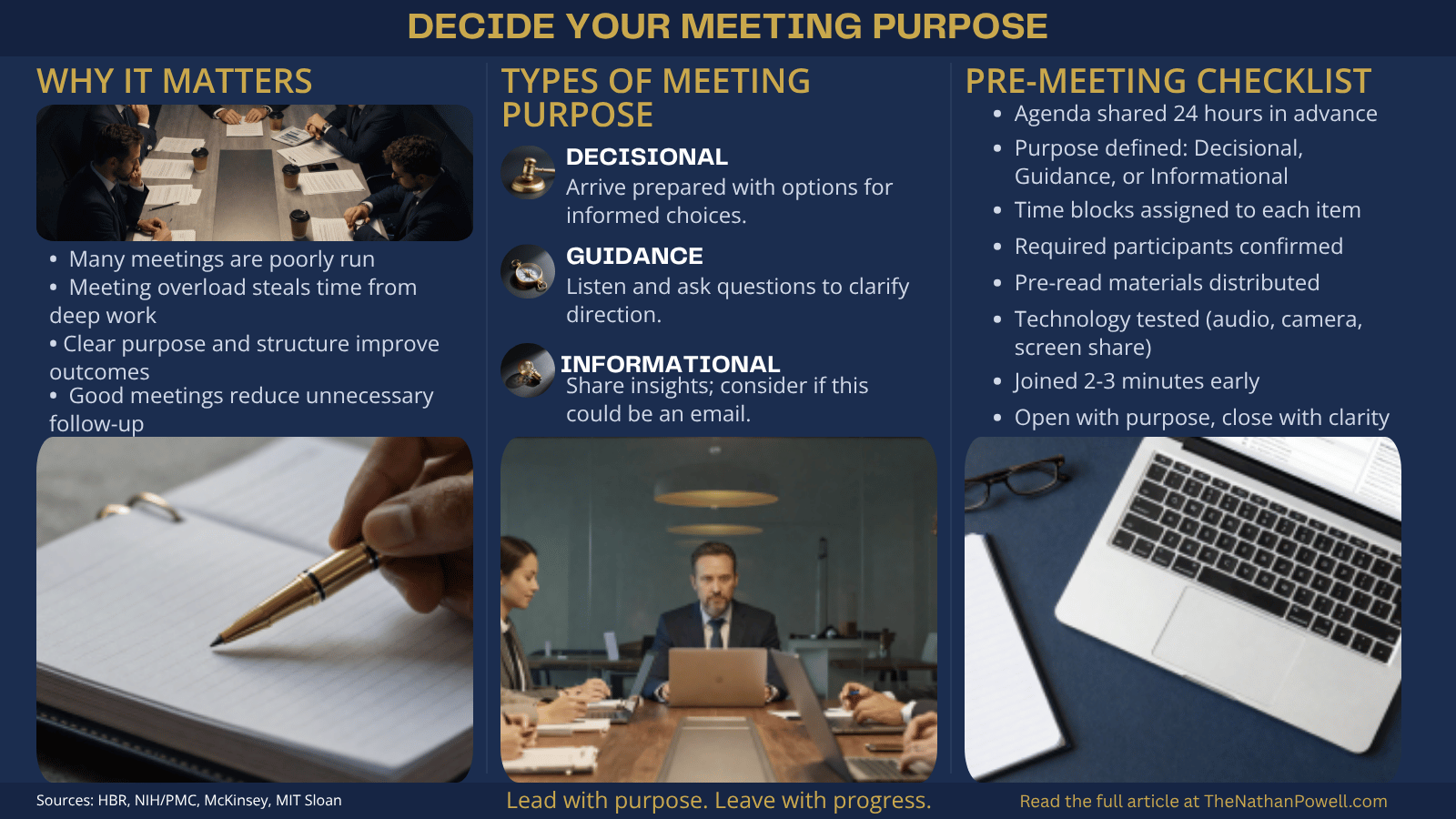
An agenda is not a list of topics. Done well, it is a precision instrument. Here's what it should include:
- Meeting purpose — Is this meeting Decisional, Guidance, or Informational? Naming the purpose changes how participants prepare and engage.
- Timed blocks for each agenda item — Assign minutes to every topic. Display or share the agenda so participants can help hold the group to schedule.
- Required participants vs. optional — Be explicit about who must be present for each decision and who can receive a summary afterward.
- Pre-read materials — If people need to arrive informed, send materials 24 hours in advance.
- Decision points clearly labeled — Don't bury a decision inside an informational block. Surface it explicitly so the room knows when they're being asked to choose.
This is where meeting leadership becomes a genuine skill — not just etiquette. The leader's job is to bring order to the organization. The agenda is your tool to do so for the meeting. Treat it accordingly.
Common Mistakes First-Time Leaders Make in Virtual Meetings
- Running without an agenda. If people don't know why they're there, they won't be engaged. Even two bullet points distributed in advance is better than nothing.
- Letting silence go unaddressed. Silence is uncomfortable. New leaders often rush past it or fill it with filler. Instead, ask a direct question. Call on a specific person. Silence, handled well, produces more insight than noise.
- Not confirming understanding. In a physical room, body language tells you if people are tracking. Virtual environments strip that away. Build the habit of checking explicitly: "Before we move on — does anyone need clarification on that decision?"
- Failing to give Devil's Advocate Time in the agenda. Often you will have a personality type that is detailed oriented and needs to address threats to the success of the endeavor. You must balance the time for progress and threat detection. Overemphasizing one or the other will lead to ineffectiveness or member disengagement. Provide a specific block where you ask, "What threats will keep us from success? What are we missing?"
- Treating virtual meetings as informal. The setting is different. The professionalism standard should not be.
- Failing to follow up. The meeting is not over when the call ends. It's over when every action item has been confirmed, assigned, and tracked.
Your Pre-Meeting Checklist
Before your next call, run through this sequence:
- Agenda written and shared at least 24 hours in advance
- Meeting purpose defined: Decisional, Guidance, or Informational
- Time blocks assigned to each agenda item
- Required participants confirmed; optional participants notified
- Pre-read materials distributed if applicable
- Technology tested — audio, camera, screen share
- Logged in two to three minutes early
- Prepared to open with purpose and close with clarity
The Standard You Set in the Virtual Room
Your team is watching. Not always consciously, but they are watching. They notice whether you are early or late, prepared or improvised, present or distracted. They take cues from your camera, your pace, your follow-through.
The leaders who build trust in virtual environments are the ones who bring the same discipline to a laptop camera that they'd bring to a board room. That consistency — small, visible, repeated — is what earns credibility over time.
Start with one rule from this list. Lock it in. Build the habit. Then add another.
Your challenge this week: Audit your last three virtual meetings. Where did your standard slip? Pick one thing to fix on your next call — and hold it.
Download the free Virtual Meeting Etiquette Guide for Hosts and Attendees below — a one-page reference you can share with your team today.
If this post was useful, subscribe to The Gryphon for leadership insights drawn from 24+ years of military command experience. No fluff. No filler. Just lessons that matter.




Member discussion